
AI marketing platform · Source-based
Done On Command review: features, pricing and limits
Done On Command AI software promises to turn one instruction into a finished page, video, email or social post for your business. Here is what the sources document, what the $47 front end actually includes, and what to check before buying.
Review summary
Not independently tested. This Done On Command review is based on published sources only.
Worth evaluating if: you run one or two small businesses, or serve a few clients, and want pages, short videos, images, email and social posts created from one shared business profile, with a human approval step before anything goes out. Look elsewhere if: you need high monthly volume, don't want to manage connected email or social accounts, or need independently verified output quality.
The front end is an advertised low-cost offer (confirm payment terms at checkout), but usage is capped by monthly credits and generation limits. It is not unlimited.
What is Done On Command?
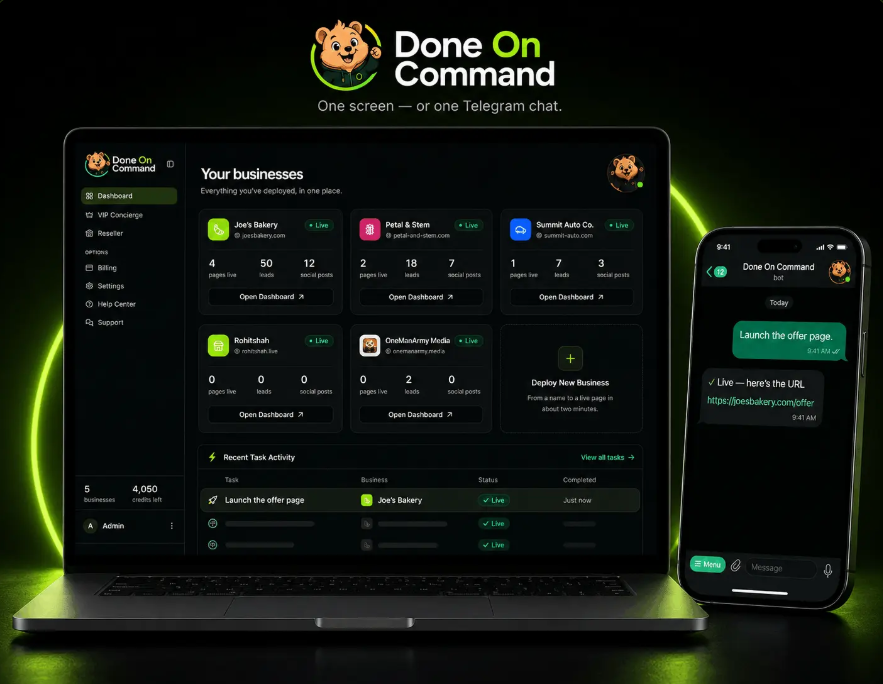
According to the vendor, Done On Command is a hosted, browser-based platform organised into seven "departments": Pages, Video, Images, Leads, Email, Social and Front Desk (chatbot). Its main idea is a persistent memory for each business, so brand details don't need re-entering for every task, combined with delivery, so work is hosted, sent or scheduled rather than left as a draft.
Sources: the official vendor partner page and the commandaiapp.com product overview. Note that commandaiapp.com describes itself as an independent affiliate information site, not the official Done On Command website, so we treat its details as secondary and unverified.
Who created it?
The vendor partner page names Todd Gross ("25+ years of JVZoo launches", running trainings and the campaign) and Rohit Shah (technical co-founder, product and engineering). The product is sold as a JVZoo launch. We have not independently verified these backgrounds, the legal entity behind the product, or its support record.
Done On Command features
Every feature below is a vendor or affiliate-source description, not a tested result.
Persistent business memory
Described as storing each business's logo, colours, fonts, writing voice, products, services and offers so later tasks reuse them. Each business gets its own memory and dashboard.
AI page and website creation
The Pages department is described as creating landing, offer, lead-capture and campaign pages or multi-page websites, editable by chat, hosted, and connectable to a custom domain. A screenshot can be supplied as a design reference.
AI video generation and editing
Described features include AI-generated scenes, voiceovers, synced captions, branded cutaways, talking-head editing and spokesperson-style videos from an uploaded photo.
Image generation
Graphics, thumbnails, ad creatives, landing-page and social images using the selected business profile.
Lead magnets and quizzes
The Leads department is described as creating quizzes, calculators, forms and interactive tools, with leads imported by agent, CSV or form. The sources themselves note this does not guarantee leads.
Email campaigns
Campaigns are drafted, approved, scheduled and sent through a connected autoresponder: GetResponse, GoHighLevel, Brevo or Mailchimp. Your contact list stays in that account.
Social media publishing
Scheduling runs through Upload-Post or Buffer; depending on the connected service, platforms listed include Facebook, Instagram, TikTok, YouTube, X, LinkedIn, Threads and Pinterest.
Website chatbot (Front Desk)
A knowledge-base chatbot installed by embed code, with its own monthly allowance. Business information needs regular review so answers stay current.
Telegram command interface
Tasks can be issued from the browser dashboard or from Telegram.
Approval workflow
The vendor states nothing sends, posts or publishes until you approve it, with revisions requested by chat.
Sources: commandaiapp.com FAQ (independent affiliate site), commandaiapp.com product overview (independent affiliate site), vendor partner page.
How it works in practice
The commandaiapp.com FAQ (independent affiliate site) describes the following five-step workflow. It is not an official vendor specification:
- Add a business by entering its website domain.
- Let it build the business memory: brand, voice, products and offers.
- Connect accounts: your autoresponder, social scheduler and, optionally, your own AI key.
- Give a task from the dashboard or Telegram, for example "create a landing page for this offer".
- Review, revise by chat and approve before anything is published, sent or posted.
The approval step matters. AI output can contain wrong prices, dates, links or claims, so plan to check every asset yourself before approving it.
Done On Command pricing
These are advertised offer prices from the official vendor partner page; confirm the price and payment terms at checkout. The affiliate-information site describes them as one-time payments, which we have not verified. The four upgrades are optional; the front end works without them.
| Offer | Advertised price | Type | What it adds |
|---|---|---|---|
| Commercial (front end) | $47 | Core product | Up to 2 businesses, 1,000 monthly credits, monthly generation limits, 1 year hosting, up to 1 GB storage, commercial licence |
| Pro | $67 | Optional upgrade | Up to 5 businesses, doubled video/edit/image/page limits, up to 4K video, one extra year of hosting, priority support |
| VIP Concierge | $67 | Optional upgrade | Done-for-you setup of three businesses, live implementation training and Q&A, direct email support |
| Agency Platinum | $97 | Optional upgrade | Up to 10 businesses, 5,000 monthly credits, page watermark removal, agency website and assets, agency licence |
| Reseller Pro | $197 | Optional upgrade | 25 Done On Command accounts you may sell at your own price |
| Everything Bundle | $347 standard | Bundle | Front end plus all four upgrades above |
The official vendor partner page and the affiliate-information site both list a separate $247 "Mega Bundle" add-on; the affiliate site also mentions a coupon price for the Everything Bundle. We have not verified either at checkout, and they are not part of the pricing above. Confirm the actual offer and price at checkout. Bought separately, the five items add up to $475. The bundle only makes sense if you expect to use several of the upgrades.
Sources: commandaiapp.com pricing breakdown (independent affiliate site), commandaiapp.com bundle details (independent affiliate site), vendor partner page price list. Checked November 10, 2026.
Front-end usage limits and allowances
The official vendor partner page advertises the $47 front end as the whole platform with "starter limits": up to 2 businesses, 1,000 monthly credits, 1 year of hosting and a commercial licence. The more detailed caps below (videos, edits, images, pages, 720p output, 1 GB storage and the page watermark) come from commandaiapp.com (independent affiliate site) and are unverified vendor limits:
- Businesses
- Up to 2
- Monthly credits
- 1,000
- New videos
- Up to 5 per month (affiliate site, unverified)
- Video edits
- Up to 5 per month (affiliate site, unverified)
- Video output
- Up to 720p (affiliate site, unverified)
- Images
- Up to 10 per month (affiliate site, unverified)
- Pages
- Up to 10 per month (with a Done On Command watermark) (affiliate site, unverified)
- Hosting
- 1 year
- Persistent storage
- Up to 1 GB (affiliate site, unverified)
- Licence
- Commercial licence (not reseller rights)
The sources state that failed or declined actions should not use credits, and that the chatbot has its own monthly allowance. They don't list exactly how many credits each action costs. The vendor claims that connecting your own OpenRouter key makes AI actions cost zero credits; we have not tested this. That provider bills you separately, and the affiliate site says the page, image and video limits still apply.
Licence, extra costs and refunds
- Commercial licence vs reseller rights. The included Done On Command commercial licence is described as covering the sale of finished work to clients. It does not allow selling Done On Command accounts; that requires the Reseller Pro upgrade (25 accounts). Agency Platinum adds a separate agency licence and removes the page watermark.
- External integrations may need their own accounts or subscriptions: an email platform (GetResponse, GoHighLevel, Brevo or Mailchimp), a social scheduler (Upload-Post or Buffer), a custom domain, an optional AI provider key, and any stock media you license.
- Refunds. The vendor partner page and affiliate site advertise a 14-day refund or money-back guarantee. We found no detailed written conditions or request procedure in these sources, so treat it as vendor-advertised and confirm it on the checkout page before buying.
Done On Command pros and cons
Pros (as documented)
- Unusually specific published allowances and price list
- One business profile reused across pages, video, images, email and social
- Approval step before anything goes live
- Commercial licence included at the $47 level
- Hosted in the browser; no installation described
Cons and caveats
- Not independently tested; output quality is unknown
- Front end capped at 10 pages, 10 images and 5 videos a month, at 720p (affiliate-site figures, unverified)
- Front-end pages carry a watermark (affiliate-site claim, unverified)
- Email and social sending depend on third-party accounts
- Credit cost per action and post-launch pricing are undocumented
- Refund conditions not fully published
Who should consider it, and who should avoid it
Who should consider it
Owners of one or two small businesses with moderate content needs; freelancers producing a few client deliverables a month; and anyone already using one of the supported email platforms or Buffer who wants one place to create and approve assets.
Who should avoid it
High-volume publishers who would exceed the monthly caps; buyers who need watermark-free pages without an upgrade; anyone unwilling to review each AI output before approving it; and anyone expecting the software itself to produce leads, clients, traffic or sales. No such results are promised or shown here.
Done On Command alternatives
Compare by function, not feature count:
- Separate specialist tools: a website builder, a design tool, an email platform and a scheduler. This means more logins, but each tool is usually better documented and can be swapped out on its own.
- Long-form content focus: if search-focused blog writing on WordPress is the main need, see our ContentRyte review.
- Ready-made client websites: for website packages rather than an ongoing creation tool, see the Ready Client Sites review.
- Preconfigured AI business workspaces: compare the ProsperaBuilder review, which covers a different bundle with its own pricing caveats.
We have not compared prices with competitors, and we have not tested any of these products against each other.
Frequently asked questions
How much does Done On Command cost?
The front end is advertised at $47; confirm payment terms at checkout. Optional upgrades are advertised at $67 (Pro), $67 (VIP Concierge), $97 (Agency Platinum) and $197 (Reseller Pro), and the Everything Bundle at $347 standard. These are vendor-advertised and promotional prices; confirm the amount at checkout.
Is the $47 plan unlimited?
No. The official partner page advertises starter limits: up to two businesses, 1,000 monthly credits and one year of hosting. The independent affiliate site adds unverified caps of up to 5 new videos, 5 video edits, 10 images and 10 pages a month, 720p video and up to 1 GB of storage.
Do I need other paid services?
Possibly. Email sending requires a supported autoresponder account, social scheduling uses Upload-Post or Buffer, a custom domain is bought separately, and an optional personal AI key is billed by that AI provider. Those services set their own fees and limits.
What is the difference between the commercial licence and Reseller Pro?
The commercial licence is described as letting you sell finished work, such as pages, videos, images, campaigns or chatbot setup, to clients. It does not let you sell Done On Command accounts. Reselling software access requires Reseller Pro, which covers 25 accounts.
Is there a refund policy?
Vendor pages advertise a 14-day refund or money-back guarantee. We did not find full written conditions or a request procedure in the sources reviewed, so read the refund terms shown on the sales and checkout pages, and get confirmation in writing if refund eligibility matters to you.
Was Done On Command tested for this review?
No. Not independently tested. This review is based on vendor and affiliate-information pages checked on November 10, 2026. We did not create pages, videos, campaigns or chatbots, connect integrations, or measure output quality or reliability.
Final verdict
Done On Command publishes more specific allowances and prices than most launch-style AI tools, and its shared business memory plus approval step is a sensible design for small teams. But everything here is vendor-described and not independently tested. The $47 front end has firm monthly limits, connected services may cost extra, and refund conditions need confirming at checkout. Decide which upgrades you actually need before you buy, rather than defaulting to the bundle.
Not sure content creation is your biggest gap? Take the free AI readiness checklist first, or read our guide to AI automation for small business.
Check current Done On Command offerAffiliate disclosure: this is an affiliate link. We may earn a commission at no extra cost to you. It does not change this review's evidence status. We have not verified that affiliate tracking works on this link. Prices, limits, licensing and refund terms are vendor-advertised; confirm them on the checkout page.